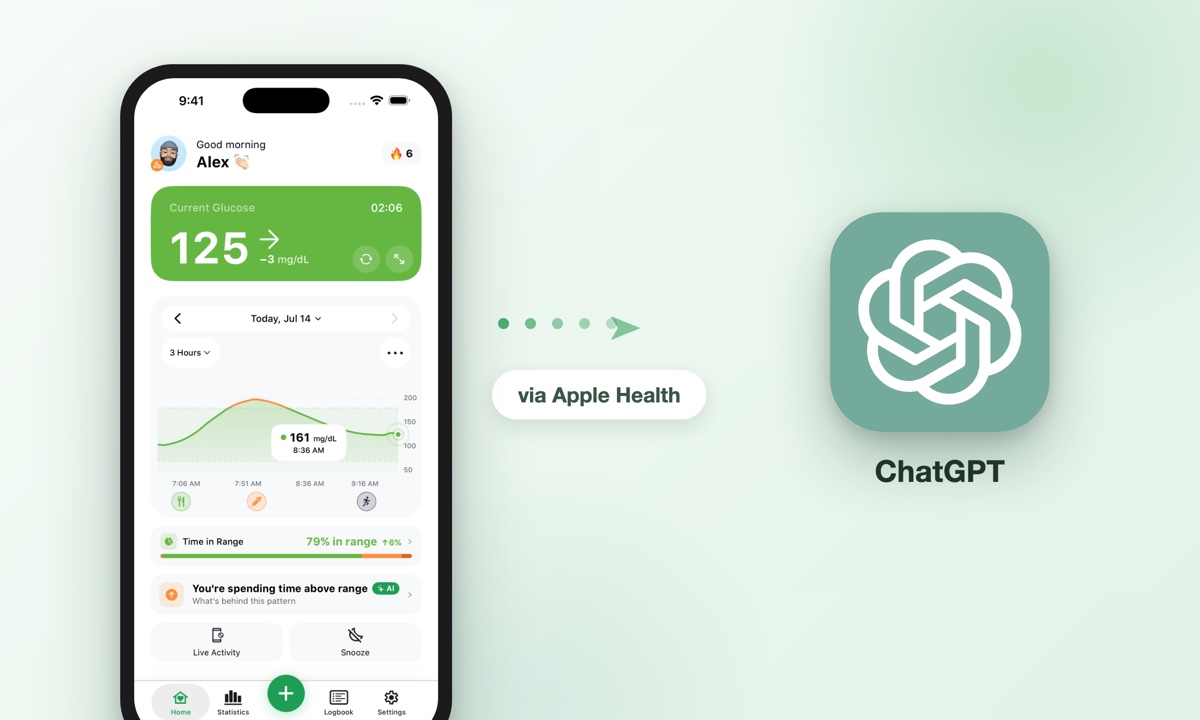
You can ask ChatGPT about your CGM data by first syncing your glucose readings to Apple Health, then connecting Apple Health to ChatGPT’s Health tab. Sugar Sense writes your CGM readings to Apple Health for free, and OpenAI’s ChatGPT Health tab (rolled out to US users aged 18 and over on iOS and the web on July 23, 2026, across the Free, Go, Plus and Pro plans) can read that data with your permission. Once connected, you can ask plain questions like “What time of day do my glucose readings tend to be highest?” and get an explanation of the patterns in your own numbers.
The short version: Turn on Apple Health sync inside Sugar Sense, then connect Apple Health in ChatGPT’s Health tab, and you can ask ChatGPT to explain your glucose trends. This is for education only and must never be used for treatment, medication, or dosing decisions. Prefer to just say it out loud across the kitchen? You can also ask Alexa for your blood sugar.
On this page
What this actually lets you do
ChatGPT cannot reach into your CGM app on its own. It needs a shared source of data, and on iPhone that source is Apple Health. Sugar Sense acts as the bridge: it takes the glucose readings it already pulls from your FreeStyle Libre, Dexcom, or Nightscout source and writes them into Apple Health.
Once your readings live in Apple Health, ChatGPT’s Health tab can read them if you grant permission. That means you can have a normal conversation about your own numbers instead of squinting at a chart. Think of it as a knowledgeable study buddy that can describe what your data shows, not a coach that tells you what to do.
This feature is US only for now, and the Apple Health connection is made from the ChatGPT app on iPhone. If you are outside the United States, or on Android, the Health tab may not be available to you yet.
How to connect Apple Health to ChatGPT (with your CGM readings in it)
Step 1: Turn on Apple Health in Sugar Sense
- Open Sugar Sense on your iPhone.
- Go to Settings, then Integrations, then Apple Health.
- Turn on the single Connect Apple Health switch. It is free, no premium needed.
- In Apple’s permission sheet, allow Blood Glucose. The same sheet covers activity, workouts, sleep and heart rate; allow what you like, and you can change any of it later inside the Health app.
After this, new readings flow into the Health app as Sugar Sense receives them. You can confirm it worked by opening Apple Health, tapping Browse, and searching for Blood Glucose.
Step 2: Connect Apple Health inside ChatGPT
- Open the ChatGPT app on your iPhone and sign in.
- Open Health from the sidebar. If you do not see it, look under the More menu.
- Tap the … menu in the top corner and choose Apple Health (the same option lives under Settings, then Apps).
- Pick the categories to share, Blood Glucose at minimum, and confirm in Apple’s sheet.
ChatGPT will only see the categories you allow, and OpenAI says it asks for permission before using connected Apple Health information to personalize a reply. You stay in control of what is shared and can turn access off at any time in your iPhone privacy settings.
Step 3: Ask your first question
Once the connection is live, start with something simple, like asking ChatGPT to summarize your glucose over the past week. Give it a day or two of synced readings first so there is enough data to describe a pattern.
Example questions that work well
The best questions ask ChatGPT to describe and explain what your data shows, not to make decisions. Here are prompts that tend to give useful, educational answers:
- “Summarize my glucose readings from the last seven days in plain language.”
- “What time of day do my readings tend to be highest and lowest?”
- “Do my morning readings look different from my evening readings?”
- “Explain what a glucose trend arrow means and how to read one.”
- “My readings often rise before breakfast. What are common general reasons that can happen?”
- “Help me write a short summary of my recent glucose patterns to share with my doctor.”
That last one is especially handy. Turning a week of numbers into a few clear sentences can make your next appointment more productive. If you want to understand the metrics ChatGPT mentions, our guides on Time in Range and glucose trend arrows explain them in depth.
Questions to avoid
Do not ask ChatGPT what to do about a reading. It is not a medical device and it does not know your full health picture. Avoid anything like “What should I do about this number?” or questions about medicine. Those belong with your healthcare team, always.
Why not just use your CGM app’s own Apple Health link?
Because of timing. Dexcom’s G7 app can share glucose with Apple Health on its own, but Dexcom’s own FAQ says Apple Health “gets the information after a three-hour delay, not in real time”. A ChatGPT summary built on that feed is always missing the last three hours, which is exactly the part you are usually curious about. Sugar Sense writes the readings it pulls through Dexcom Share into Apple Health as they arrive, a few minutes apart, so the copy ChatGPT reads is close to what your phone shows.
For FreeStyle Libre the path to Apple Health is a companion app: Sugar Sense writes the readings it receives through LibreLinkUp. Nightscout works the same way. In every case the Apple Health copy is for looking back, not for alarms, which is the point of the next two sections.
Is my health data private?
Privacy is a fair worry when your glucose numbers are involved. A few things help here.
First, Apple Health data stays on your device and is encrypted, and you decide which apps can read or write it. Sugar Sense only writes glucose readings when you turn the setting on, and ChatGPT only reads what you permit.
Second, OpenAI states that connected Apple Health information, and the conversations that use it, are not used to train its models or to target ads, and that Health conversations get additional encryption on top of ChatGPT’s default encryption, as reported at the July 2026 rollout. That is a meaningful distinction from a normal chat. Still, treat any online tool with care and share only what you are comfortable sharing.
Third, you can disconnect at any time. In your iPhone settings you can revoke ChatGPT’s access to Apple Health, and in Sugar Sense you can turn off Apple Health sync. Nothing is permanent.
Why ChatGPT is for learning only, never treatment
This is the part that matters most. ChatGPT can be a great teacher. It can explain what a term means, describe a pattern, and help you phrase a question for your doctor. It should never be used to make a treatment choice.
Do not use ChatGPT to decide anything about medication or dosing. It cannot see your body, your other conditions, your medicines, or the context around a reading. It can also be confidently wrong. Any decision about treatment belongs to you and your healthcare provider, using your actual CGM device and its alarms.
Also remember that the data in Apple Health is a copy that arrives after a short delay. It is fine for looking back at trends, but it is not a live safety alarm. For real-time lows and highs, rely on your CGM and an alerting app. Our article on why real-time glucose alerts matter explains the difference, and predictive low glucose alerts covers early warnings.
Frequently asked questions
What is ChatGPT Health?
A separate Health space inside ChatGPT where you can connect Apple Health and, in the US, supported medical records, and then ask questions that use that information. OpenAI opened it to US users aged 18 and over on July 23, 2026, on the web and in the iOS app.
Do I need a paid ChatGPT plan?
The Sugar Sense side is free: syncing your glucose readings to Apple Health does not cost anything. At the July 2026 rollout, OpenAI listed the Health tab for the Free, Go, Plus and Pro plans in the US. Plans and availability can change, so check inside the ChatGPT app to see what your account offers.
How can I export Apple Health data to ChatGPT?
You do not need an export. Connecting Apple Health inside ChatGPT’s Health tab, as in step 2, lets ChatGPT read the categories you allow directly, and the connection stays current as new readings arrive from Sugar Sense.
Does ChatGPT Health work on Android?
Not yet. The rollout covers the web and the iOS app, and the Apple Health connection needs the iPhone app. OpenAI has not announced an Android date.
Can ChatGPT read my Dexcom or Libre data directly?
No. ChatGPT reads Apple Health, not your CGM app. Something has to put the readings into Apple Health first: Dexcom’s own app can, with a three-hour delay, and Sugar Sense does it for Libre, Dexcom and Nightscout accounts as readings arrive.
Is this available outside the United States?
Not yet. The ChatGPT Health tab rolled out to US users aged 18 and over on iOS and the web in July 2026, and OpenAI has not announced other countries. If you are elsewhere, you can still sync Sugar Sense to Apple Health and use it with other Apple Health tools while you wait for wider availability.
Will ChatGPT replace my doctor or my CGM app?
No. ChatGPT is an educational tool for understanding your data. It does not replace your CGM device, its alarms, or the guidance of your healthcare team. Keep using your CGM app for live monitoring and alerts.
Why do the numbers in Apple Health look slightly delayed?
Apple Health receives readings after Sugar Sense records them, so there can be a short lag. That is normal and fine for reviewing trends. If your readings are not syncing at all, check that Apple Health is connected under Settings, Integrations in Sugar Sense and that Blood Glucose is allowed in the Health app.
Bringing it together with Sugar Sense
Sugar Sense makes this whole setup simple by syncing your FreeStyle Libre, Dexcom, or Nightscout readings to Apple Health for free, which is what ChatGPT’s Health tab reads from. It also gives you real-time glucose on your iPhone and Apple Watch, high and low alerts, Time in Range stats, and Care Circle sharing for family. If you want to explore your trends with ChatGPT while keeping live monitoring on your device, you can download Sugar Sense and turn on Apple Health sync in a couple of taps.
This article is for education only. A companion app like Sugar Sense, and a general tool like ChatGPT, never replace your CGM device or its alarms. Always confirm important readings on your device, and make all treatment, medication, and dosing decisions with your healthcare provider. See our medical disclaimer for more.