Remote glucose monitoring has transformed what it means to care for a loved one living with diabetes, letting you check their glucose trends from across the house or across the country. Whether you are a parent of a child with type 1 diabetes, an adult child supporting an aging parent, or a partner who simply wants peace of mind overnight, remote glucose monitoring can turn anxious guesswork into calm, informed support. This guide explains how it works, what to watch for, and how to be a helpful caregiver without becoming an overbearing one.
What Remote Glucose Monitoring Actually Is
At its core, remote glucose monitoring lets a continuous glucose monitor (CGM) worn by the person with diabetes share their readings with someone else. A small sensor measures glucose just under the skin and sends a new reading every few minutes. Instead of those numbers staying only on the wearer’s phone, they can be securely shared so that a designated caregiver sees the same data, usually with a short delay of just a few minutes.
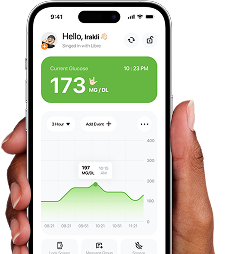
Modern systems such as FreeStyle Libre (through LibreLinkUp) and Dexcom (through Dexcom Share) were built with this kind of sharing in mind. Companion apps then bring that data together in one place, often adding extras like a trend arrow, a small graph of recent history, and alerts when glucose drifts too high or too low.
Who Benefits Most
- Parents and guardians of children, who want visibility during school hours or sleepovers.
- Adult children supporting an older parent who may not always notice symptoms.
- Spouses and partners who want reassurance overnight, when lows can go unnoticed.
Why Remote Glucose Monitoring Matters for Caregivers
The single biggest reason caregivers value remote glucose monitoring is the ability to spot a low before it becomes serious. Hypoglycemia (low glucose) can develop quickly, and the person experiencing it may feel confused, drowsy, or unable to act. A timely alert on your own phone means you can check in, offer a reminder, or be ready to help.
It also reduces the constant texting and phone calls that can wear on a relationship. Instead of asking “what’s your number?” several times a day, you can glance at a trend and only reach out when something genuinely looks off. That shift, from interrogation to quiet awareness, is good for everyone.
Good remote monitoring is less about surveillance and more about being able to relax, because you will know when you are actually needed.
Understanding the Numbers and Trends
You do not need to be a clinician to be a helpful caregiver, but a little context goes a long way. Glucose is usually measured in mg/dL or mmol/L, and many people aim to keep readings within a general target range during the day. As broad education, a commonly referenced target range is roughly 70 to 180 mg/dL (about 3.9 to 10 mmol/L), though every person’s individual goals are set with their healthcare team.
The Trend Arrow Tells the Story
A single number is only half the picture. The trend arrow shows which direction glucose is heading and how fast:
- A steady, flat arrow usually means things are stable.
- An arrow pointing down means glucose is falling, which is worth watching if it is already near the lower end.
- An arrow pointing up means it is rising.
Some apps go further with a predictive “heading low” alert that flags when glucose is on a path toward a low before it actually gets there, giving everyone a little more lead time. Remember that your role is to notice and support, not to recommend treatment changes. Decisions about food, activity, and medication belong to the person with diabetes and their care team.
Setting Up Remote Glucose Monitoring Without Overstepping
Technology works best when the relationship around it is healthy. A few principles keep remote glucose monitoring supportive rather than stressful.
Agree on Expectations First
Before you start, talk openly about what the person being monitored is comfortable with. Which alerts should reach you? Overnight only, or around the clock? When is a text welcome, and when is it intrusive? Consent and clear boundaries are especially important with teenagers, who are building independence.
Tune Alerts to Avoid Fatigue
If every small fluctuation buzzes your phone, you will start ignoring all of them. That is called alarm fatigue, and it is dangerous. Focus on the alerts that matter most, such as urgent lows, and use gentler settings for less critical changes. Thoughtful, asymmetric alert settings keep the truly important notifications meaningful.
Respect Privacy and Independence
- Resist the urge to comment on every reading.
- Let the person lead their own day-to-day decisions.
- Use what you see to offer help, not judgment.
When to Act and When to Wait
One of the hardest parts of caregiving is knowing when a reading needs your attention. A brief dip that quickly recovers is usually not cause for alarm. A persistent low, a rapid downward trend, or a reading the person cannot respond to is different and may call for a check-in or, in an emergency, help from others.
Work out an action plan together in advance: who to call, what counts as an emergency, and how the person prefers to be contacted. Having that conversation when everyone is calm makes the rare urgent moment far less frightening. And whenever you have questions about thresholds, patterns, or treatment, bring them to the healthcare team rather than improvising.
Bringing It All Together
Remote glucose monitoring is one of the most reassuring tools available to caregivers today. Used with empathy and clear boundaries, it lets you stay connected, respond when it counts, and give the person you love the freedom to live their life.
If you are looking for a single place to follow a loved one’s glucose, get smart high and low alerts, and view trends on your iPhone or Apple Watch, Sugar Sense brings remote glucose monitoring, family sharing, and a predictive heading-low alert together in one calm, easy-to-use app.
This article is for educational purposes only and is not medical advice. Always consult your healthcare provider about your diabetes management.